Mounting the Pixhawk
Autopilot Orientation
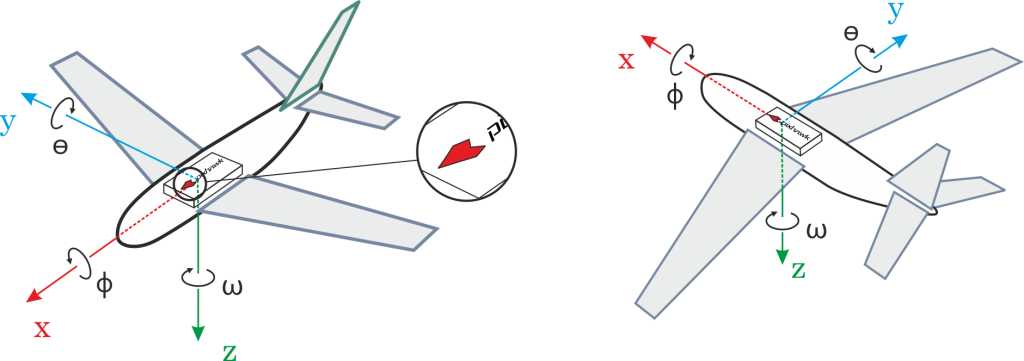
By default, the flight controller and the external compass should be placed on the aircraft frame oriented so that the arrow points towards the front of the vehicle. If the card or external compass are in any other direction, you need to correct the orientation in firmware.
Calculating Orientation
The compensations for the rotation angles YAW, PITCH and / or ROLL are calculated in relation to the vertical orientation pointing forward (clockwise rotation around the Z, Y and X axes, respectively). This diagram is called body frame and the default orientation is given by ROTATION_NOME.
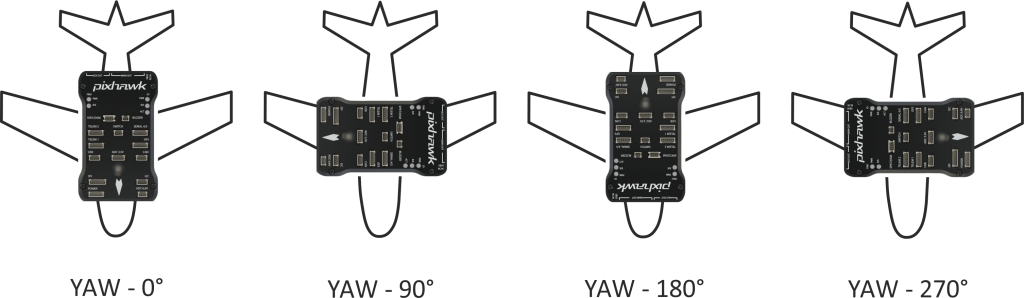
For example, the image below shows aircraft rotations around the z axis (YAW), corresponding, respectively, to: ROTATION_NONE, ROTATION_YAW_90, ROTATION_YAW_180, ROTATION_YAW_270.
Setting the Orientation
To set the orientations on firmware:
Note
Before setting the orientation, QGroundControl must be started, connected to the vehicle and the firmware must have already been installed on the flight controller board.
- Select the Gear icon (Vehicle Setup) in the top toolbar and then Sensors in the sidebar.
- Select the Set Orientations button.
- Select the autopilot orientation, as calculated above.
- Select the External Compass Orientation in the same way (this option will only be displayed if your vehicle has an external compass).
- Press OK.
Tip
Complete documentation on how to adjust the autopilot orientation is available in Autopilot Orientation.
Vibration Isolation
Pixhawk boards have built-in accelerometers and gyroscopes, being sensitive to vibrations. High levels of vibration can cause a number of problems, including reduced flight performance, shorter flights and increased vehicle wear. In extreme cases, vibration can lead to sensor failures, resulting in estimation errors or even flight interruption.
For this reason, the Pixhawk comes with vibration damping foams.
The Pixhawk must be mounted on the aircraft using the anti-vibration foams included in the kit. It should be positioned as close as possible to the vehicle’s center of gravity.
Tip
To determine whether the vibration levels are too high and use some techniques to improve the vibration characteristics, recommended to the topic PX4 user guide > Vibration Isolation.